 ช้างเผือก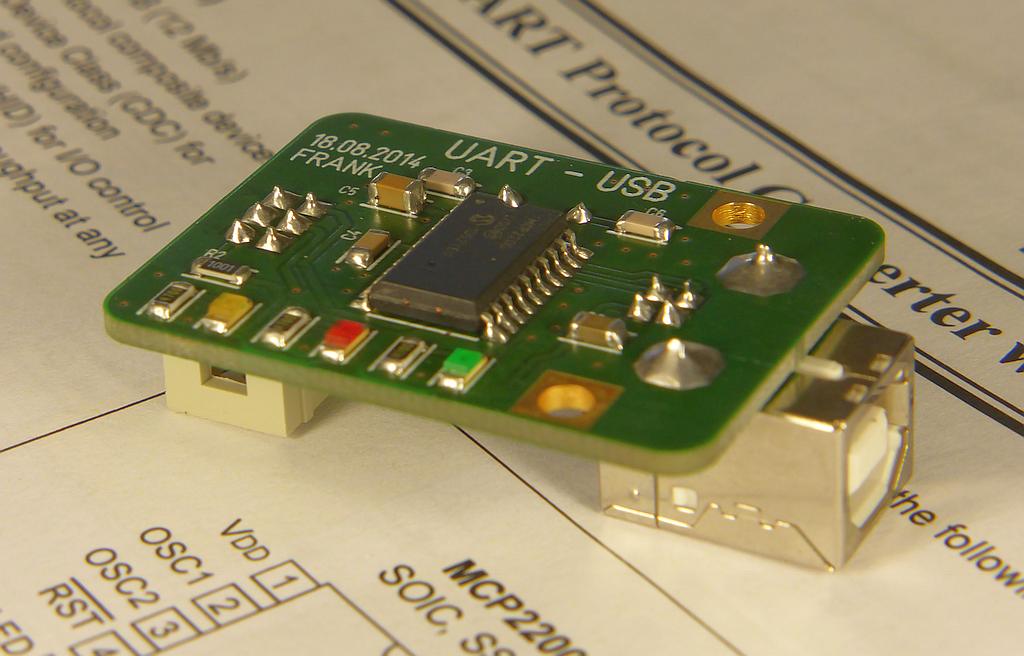
Categories
Statistics
Since 08.08.2014
Counts only, if "DNT = disabled".
216.73.217.18
216.73.217.18
Counts only, if "DNT = disabled".
216.73.217.18
216.73.217.18
Info




เราจะทำแบบวิศวกรผู้ยิ่งใหญ่
5. November 2026
YOUR OPINION •••
average: 0.001, n: 0

When using this form, your ip is stored in order to avoid multiple voting on the same website. That's it.
When using this form, your ip is stored in order to avoid multiple voting on the same website. That's it.
UART-USB-Adapter.php 7343 Bytes 04-03-2025 19:13:29
Micro-Projects • Tools : UART - USB Adapter
This USB-to-UART converter provides an easy-to-use, small-footprint, cost-effective option for adding USB connectivity to existing systems
which have an UART.
This tiny little adapter uses the MCP2200 from Microchip. It has a 64
bit RX and TX buffer and is housed in a SSOP-20 package. A 12 MHz crystal ensures precise timing. The UART controller can handle
up to 19200 bits, 8 data bits, no parity, 1 stop bit. (for 0% error). It is equipped with a 256 byte eeprom and various GPIO (which are not used).
The board is equipped with three leds which indicated the status. (Power, RX, TX).
The used 6-pin header has always the same pin assignment, so they (RS232,USB,XPORT,...) are all interchangeable.
Please be aware that the RX/TX pin marking on the MCP2200 (datasheet) is from the point of view of the computer !
Configuration
The device must be configured before use. Microchip offers several tools to do so. You may freely choose a VID (vendor ID) and PID (product ID)
as long as your project will not escape your lab. (In case you leave the door open : a wrong driver may be loaded :-) So be careful !
You may lock yourself out when using a different VID (default:0x04D8)
We suggest you use the following settings : (Tools are from Microchip Website)
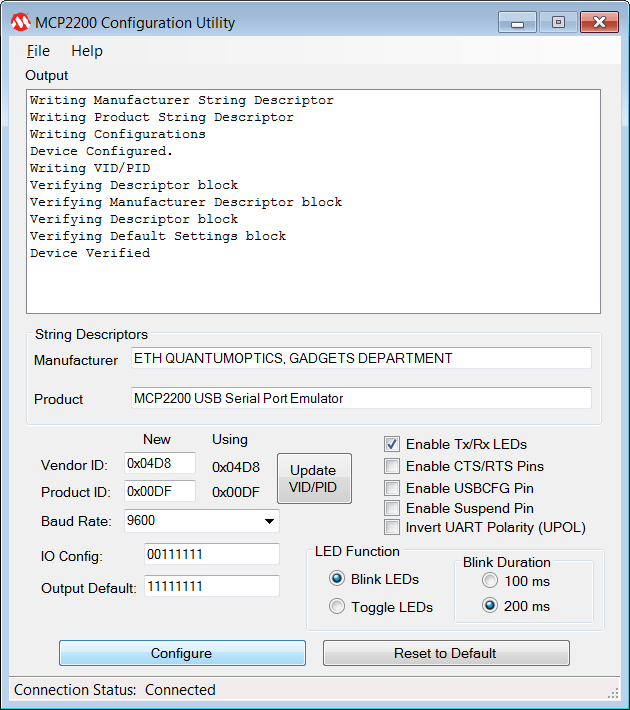
We suggest you use the following settings : (Tools are from Microchip Website)
Testing
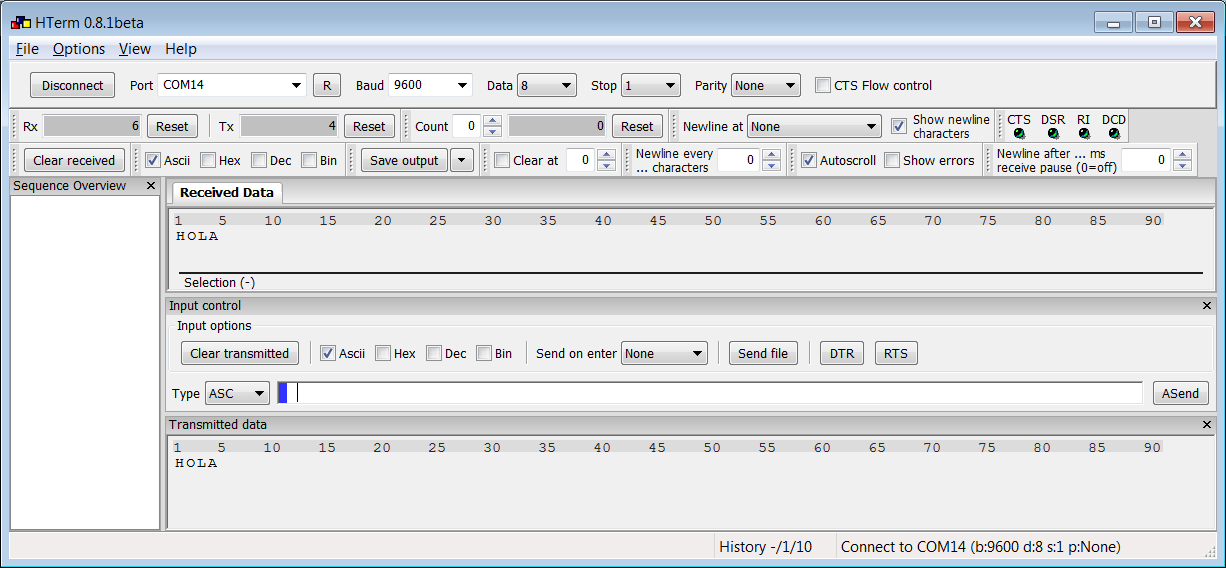
The device may easily be tested using HTerm in a loopback configuration.
(RX is tied to TX and so the data is send back to the computer).
Downloads


Anything Else • Troubleshooting
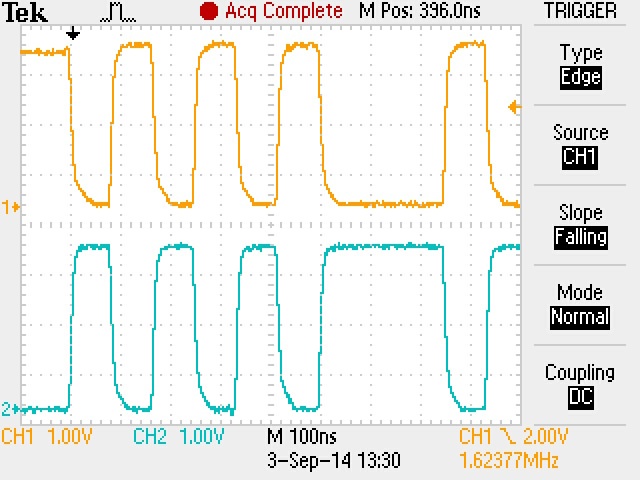 As the name 'bus' suggests, there are more 'passengers' travelling. Therefore a header with some destination information has to be added.
This may explain, that the data on the usb-bus must travel much faster and, that 'your' passenger is hard to be spotted out.
The picture on the left shows the signals on D+ (top) and D- (bottom). If traffic looks like that, you may assume, that the bus is working
properly. For the youngplayers among you, it is therefore recommended to start with a proven design, so you can take care of the data
at the output of the MCP2200 or whatever else solution is used.
As the name 'bus' suggests, there are more 'passengers' travelling. Therefore a header with some destination information has to be added.
This may explain, that the data on the usb-bus must travel much faster and, that 'your' passenger is hard to be spotted out.
The picture on the left shows the signals on D+ (top) and D- (bottom). If traffic looks like that, you may assume, that the bus is working
properly. For the youngplayers among you, it is therefore recommended to start with a proven design, so you can take care of the data
at the output of the MCP2200 or whatever else solution is used.
✈ Share your thoughts
The webmaster does not read these comments regularely. Urgent questions should be send via email.
Ads or links to completely uncorrelated things will be removed.
|
t1 = 7419 d
t2 = 269 ms |
★ ★ ★ Copyright © 2006 - 2026 by changpuak.ch ★ ★ ★
|
|


